Registries
What are Registries?
Minecraft stores a lot of its data in registries, such as item types, block types, entity types, etc. Paper exposes these as org.bukkit.Registry. Since Paper does not allow the creation of additional registries, Nova also introduces its own NovaRegistry type, which is used for additional things like GuiTexture.
You can think of registries as a Map<Key, V> where Key is a namespaced identifier like minecraft:stone and V the corresponding item- or block type.
Registry Entries
(If you're familiar with Minecraft's internals, think: Holder.Reference<T>)
Nova introduces the RegistryEntry<T> type, which represents an entry in a registry that may not exist yet but will definitely exist after startup.
This is useful as it allows you to wire things together without having to worry about initialization order or circular dependencies. For example, you can create an item for a block via Addon.item(block: RegistryEntry.Paper<BlockType>) during initialization, even though the BlockType does not exist yet.
RegistryEntry<T> is also a Provider, which allows you to chain lazy transformations. It will also automatically update on registry reload.
Nova has pre-defined registry entries for all vanilla types. You can find them in appropriately named singleton objects like ItemTypeEntries or BlockTypeEntries.
Registry Entry Sets
(If you're familiar with Minecraft's internals, think: HolderSet<T>)
Nova also introduces the RegistryEntrySet<T> type, which represents a set of registry entries. This can either be a direct set of entries or a tag. Like RegistryEntry<T>, the tag does not need to exist yet, but Nova guarantees its existence after startup.
RegistryEntrySet<T> is also a Provider, which allows you to chain lazy transformations. It will also automatically update when the underlying tag changes.
You can create registry entry sets via registryEntrySetOf:
Nova has pre-defined registry entry sets for all vanilla tags. You can find them in appropriately named singleton objects like ItemTypeTags or BlockTypeTags.
Creating and editing Tags
You can create and edit tags via the ...Tag functions on your addon object:
@Init(stage = InitStage.PRE_PACK)
object Items {

    val ITEM_A = ExampleAddon.item("a") {}
    val ITEM_B = ExampleAddon.item("b") {}

    // Creates a custom tag named #example_addon:my_tag containing ITEM_A and ITEM_B
    val MY_TAG = ExampleAddon.itemTag("my_tag") {
        add(ITEM_A)
        add(ITEM_B)
    }

    init {
        // Adds ITEM_A and ITEM_B to the existing #minecraft:dirt tag
        ExampleAddon.itemTag(ItemTypeTags.DIRT) {
            add(ITEM_A)
            add(ITEM_B)
        }
    }

}
Tag sources can also be reactive:
// Creates a custom tag named #example_addon:my_tag that reads its contents
// from tag_sources.yml and supports config reloading.
val MY_TAG = ExampleAddon.itemTag("my_tag") {
    add(CONFIGS["example_addon:tag_sources"].entry(emptyList(), "my_tag"))
}
You can also specify tag membership the other way around. Use the tags function to declare membership directly in the builder of a registry element:
@Init(stage = InitStage.PRE_PACK)
object Items {

    // Creates ITEM_A and ITEM_B, both of which are in #example_addon:my_tag and #minecraft:dirt
    val ITEM_A = ExampleAddon.item("a") { tags(MY_TAG, ItemTypeTags.DIRT) }
    val ITEM_B = ExampleAddon.item("b") { tags(MY_TAG, ItemTypeTags.DIRT) }

    // Creates a custom tag named #example_addon:my_tag
    val MY_TAG = ExampleAddon.itemTag("my_tag") {}

}
You can also declare tag membership through ItemBehavior and BlockBehavior:
Registry Reloading
Many registries can be reloaded at runtime to help you speed up development. Reloading re-runs the registered builder functions. Registry reloading can be triggered manually via /nova reload registry <registry>, but it also happens automatically when a hot-swap is detected.
Vanilla Registries like the item- or block registries cannot be reloaded by themselves. However, Nova can still re-run the builder lambda and update certain parts of the object. Some aspects of these elements still require a full restart, but you can use it to change out item- & block behaviors, data components, etc.
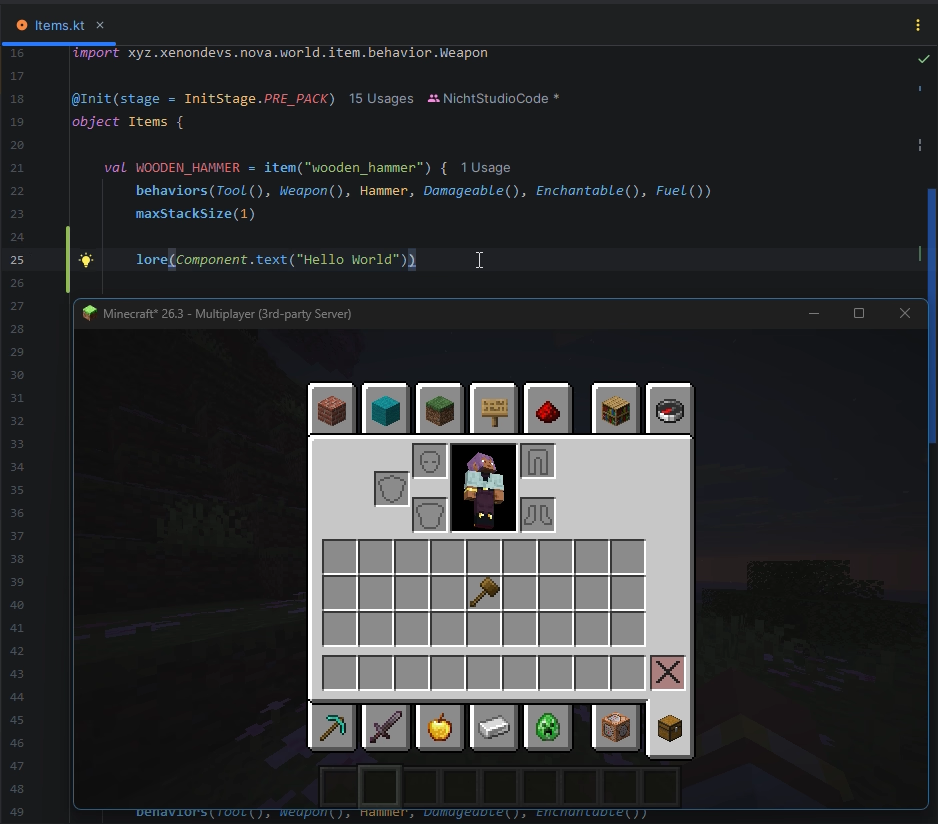
Changing an Item's lore via registry reloading
ItemType is registered in a vanilla registry that is not reloadable, so reloading does not create a new ItemType instance. This also means that the RegistryEntry.Paper<ItemType> is NOT re-bound and NO update is propagated. However, inventories are refreshed post-reload, so we can still see the change here:
NovaRegistry supports reloading natively. Reloading a NovaRegistry creates a completely new element instance. The RegistryEntry.Nova<T> is re-bound to point to the new value.
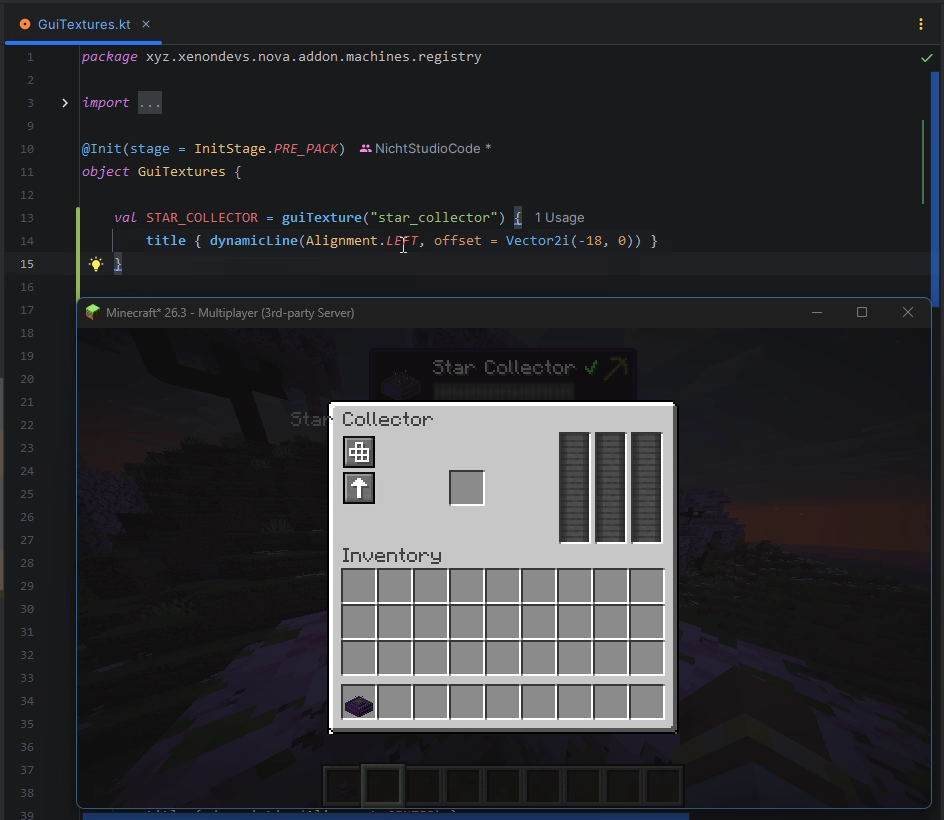
Changing a GUI Texture via Registry Reloading
GuiTextures are registered in a NovaRegistry, so reloading creates a new GuiTexture instance. Since the RegistryEntry.Nova<GuiTexture> is a Provider, we can wire it to InvUI's window title, which makes it refresh automatically when the registry is reloaded:
Full registry reloading vs. Simple re-running
NovaRegistry supports full reloading, creating new element instances per reload. The RegistryEntry.Nova<T> is re-bound, reactively updating its children.
Vanilla registries like the item- or block registry do not, the ItemType and BlockType instances stay the same. The RegistryEntry.Paper<T> is NOT re-bound and no update is propagated.
Custom Nova Registries
You can also create your own NovaRegistry, corresponding builders, and hook into Nova's registry reloading system.
First, create the type to be stored in the registry. This must implement NovaRegistryElement:
class MyElement internal constructor(
    override val entry: RegistryEntry.Nova<MyElement>,
    val someData: String
) : NovaRegistryElement<MyElement>
Then, create the corresponding registry:
@Init(stage = InitStage.PRE_PACK)
object MyElements {
    internal val registry = ExampleAddon.registry<MyElement>("my_element")
}
Then, create the corresponding builder interface and implementation:
private class MyElementBuilderImpl(
    override val entry: RegistryEntry.Nova<MyElement>,
) : MyElementBuilder, RegistryElementBuilder.Nova<MyElement> {

    override val tags: Provider<Set<RegistryEntrySet.Nova.Tag<MyElement>>>
        field = mutableProvider<Set<RegistryEntrySet.Nova.Tag<MyElement>>>(emptySet())
    private var someData = ""

    override fun tags(vararg tags: RegistryEntrySet.Nova.Tag<MyElement>) {
        this.tags.set(this.tags.get() + tags)
    }

    override fun someData(data: String) {
        someData = data
    }

    override fun build() = MyElement(entry, someData)

}
Finally, add an extension function on Registrar that calls RegistryLoader.enqueueNova to register the element:
fun Registrar.myElement(name: String, myElement: MyElementBuilder.() -> Unit): RegistryEntry.Nova<MyElement> =
    RegistryLoader.enqueueNova(MyElements.registry, key(namespace(), name), ::MyElementBuilderImpl, myElement)
Now, you can register your custom elements with the same syntax as for Nova's built-in registries. Registry reloading will also work automatically.