NetworkedTileEntity
NetworkedTileEntity inherits from TileEntity and NetworkEndPoint and provides you with an easy way to make your TileEntity network-compatible.
class ExampleTileEntity(
    block: Block,
    blockState: NovaBlockState,
    data: Compound
) : NetworkedTileEntity(block, blockState, data) {

}
End Point Data Holders
To make data available for networks, we need to add EndPointDataHolders to our tile-entity.
For the built-in network types, there are utility functions in NetworkedTileEntity to easily create them from the tile-entity's internal data.
Energy
Create an EnergyHolder via NetworkedTileEntity#storedEnergyHolder:
class ExampleTileEntity(block: Block, blockState: NovaBlockState, data: Compound) : NetworkedTileEntity(block, blockState, data) {

    private val energyHolder = storedEnergyHolder(
        maxEnergy = provider(1000L), // (1)!
        allowedConnectionType = NetworkConnectionType.BUFFER // (2)!
    )

    override fun handleTick() {
        energyHolder.energy += 10 // (3)!
    }

}
- The maximum amount of energy that can be stored.
- Networks can both insert and extract energy.
- Every tick, we generate 10J of energy.
Item
Create an ItemHolder via NetworkedTileEntity#storedItemHolder:
class ExampleTileEntity(block: Block, blockState: NovaBlockState, data: Compound) : NetworkedTileEntity(block, blockState, data) {

    private val inputInventory = storedInventory(name = "input", size = 9) // (1)!
    private val outputInventory = storedInventory(name = "output", size = 9) // (2)!

    private val itemHolder = storedItemHolder(
        inputInventory to NetworkConnectionType.INSERT, // (3)!
        outputInventory to NetworkConnectionType.EXTRACT // (4)!
    )

}
- Example inventory intended for input with 9 slots.
- Example inventory intended for output with 9 slots.
- Networks can only insert into the input inventory.
- Networks can only extract from the output inventory.
Fluid
Create a FluidHolder via NetworkedTileEntity#storedFluidHolder:
class ExampleTileEntity(block: Block, blockState: NovaBlockState, data: Compound) : NetworkedTileEntity(block, blockState, data) {

    private val fluidContainer = storedFluidContainer(
        name = "fluidContainer",
        allowedTypes = setOf(FluidType.WATER), // (1)!
        capacity = provider(10_000L) // (2)!
    )

    private val fluidHolder = storedFluidHolder(
        fluidContainer to NetworkConnectionType.EXTRACT // (3)!
    )

    override fun handleTick() {
        fluidContainer.addFluid(FluidType.WATER, 1_000) // (4)!
    }

}
- The types of fluid that can be put into this container. (Only water in this case)
- The maximum amount of fluid that can be stored.
- Networks can only extract from the fluid container.
- Every tick, the fluid container replenishes by 1_000 mB of water.
Side Configuration Menu
Using openSideConfigItem, you can easily add a button that opens Nova's built-in side configuration menu to our tile entity. With this GUI, users can change the side-configuration for all built-in network types:
class ExampleTileEntity(block: Block, blockState: NovaBlockState, data: Compound) : NetworkedTileEntity(block, blockState, data) {

    // end point data holders from the previous examples
    private val energyHolder = storedEnergyHolder(provider(1000L), NetworkConnectionType.BUFFER)
    private val inputInventory = storedInventory("input", 9)
    private val outputInventory = storedInventory("output", 9)
    private val itemHolder = storedItemHolder(inputInventory to NetworkConnectionType.INSERT, outputInventory to NetworkConnectionType.EXTRACT)
    private val fluidContainer = storedFluidContainer("fluidContainer", setOf(FluidType.WATER), provider(10_000L))
    private val fluidHolder = storedFluidHolder(fluidContainer to NetworkConnectionType.EXTRACT)

    override val menu = TileEntityMenu.cachedWindow {
        upperGui by gui(
            "s . . . . . . . .",
            ". i i i . o o o .",
            ". i i i . o o o .",
            ". i i i . o o o .",
            ". . . . . . . . ."
        ) {
            's' by openSideConfigItem(
                // localization keys for inventories
                inventories = mapOf(
                    itemHolder.getNetworkedInventory(inputInventory) to "inventory.example_addon.input",
                    itemHolder.getNetworkedInventory(outputInventory) to "inventory.example_addon.output"
                ),
                // localization keys for fluid containers
                containers = mapOf(fluidContainer to "container.example_addon.fluid_tank")
            )
            'i' by inputInventory
            'o' by outputInventory
        }
    }

}
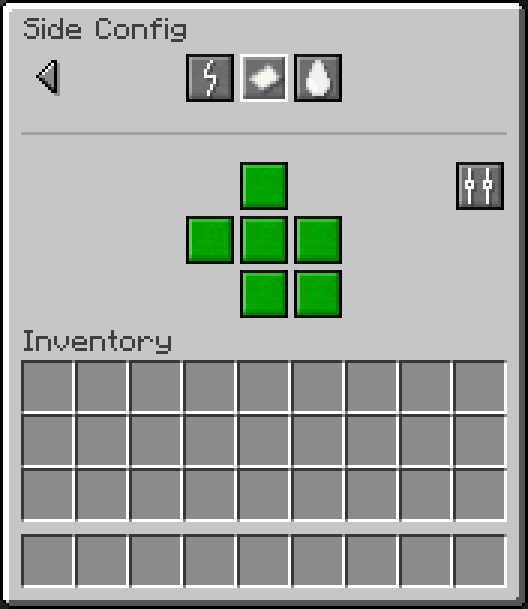
Of course, nothing stops you from creating your own side configuration menu.